
A quote is a sales document that lists what you propose to sell, at what price, and how taxes and discounts apply—before you raise an invoice. It gives your customer a clear proposal and leaves an audit trail of what was agreed, and you can convert it to an invoice or sales order when they accept.
Quotes reuse the same items, customers, and tax settings as invoices, so your catalog stays the single source of truth and routine documents stay consistent.
Create a quote
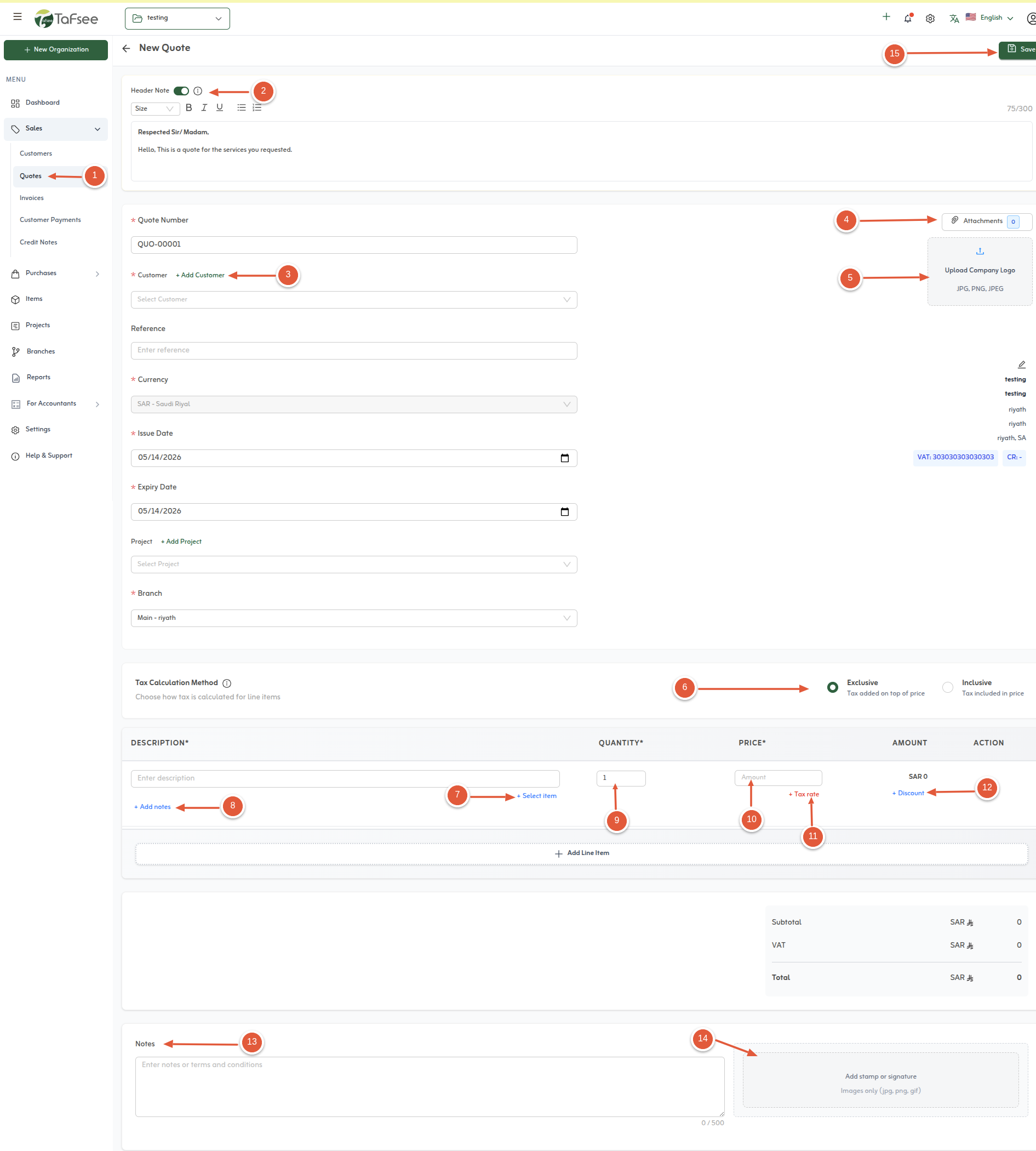
Follow these steps in the quote form, as shown in the screenshot.
- Open Sales, then choose the Quote option to start a new quote.
- Add an optional header note if you want context to appear above the line items.
- Select the customer this quote is for.
- Attach supporting files to the quote when needed.
- Upload your organisation logo so the PDF matches your brand.
- Choose whether taxes are inclusive or exclusive, matching how you quote.
- Add line items: pick catalog items or enter details in the items section.
- Add notes on individual lines when a row needs clarification.
- Set quantities for each line.
- Set unit prices per line.
- Pick the correct tax treatment for each line—VAT on sales, zero-rated, exempt, or out of scope.
- Apply line discounts using a percentage or a fixed amount.
- Add a footer or internal note for the quote overall.
- Add a digital signature or stamp if your process requires it.
- Save the quote to store it as a draft or continue with your approvals workflow.
After saving, send the PDF to the customer or route it internally for approval. Drafts do not affect receivables until you convert or issue.
When the customer accepts, use the convert-to-invoice guide in the next article so lines and VAT carry forward without re-keying.
Quick tips
- Set a quote validity date in notes if your policy requires it.
- Match inclusive or exclusive tax to how you priced the deal.
- Attach specs or contracts before sending for legal review.