
Use Record payment to capture money you received from a customer against issued invoices: it reduces or clears invoice balances and posts to the cash or bank account you expect during reconciliation.
One receipt can settle a single invoice, several invoices, or a partial payment; the receipt date and payment method feed ageing reports and bank matching. Corrections normally follow controlled flows—reverse or adjust entries—rather than deleting posted history when your organisation requires an audit trail.
Recording a payment
- Open Record Payment under Sales (or use the shortcut from Quick Create) to start a new customer receipt.
- Select the customer who paid.
- Choose the Paid through account—the bank or cash account where the funds actually landed.
- Select the payment method your organisation tracks, such as cash, cheque, bank transfer, UPI, or other enabled options.
- When the screen lists outstanding invoices for that customer, allocate the amount—fully or partially—to the invoices you are settling.
- Add a description or reference note so your team recognises the remittance on statements and during reconciliation.
- Save the payment (for example Save as paid) to update invoice balances and your customer receivables.
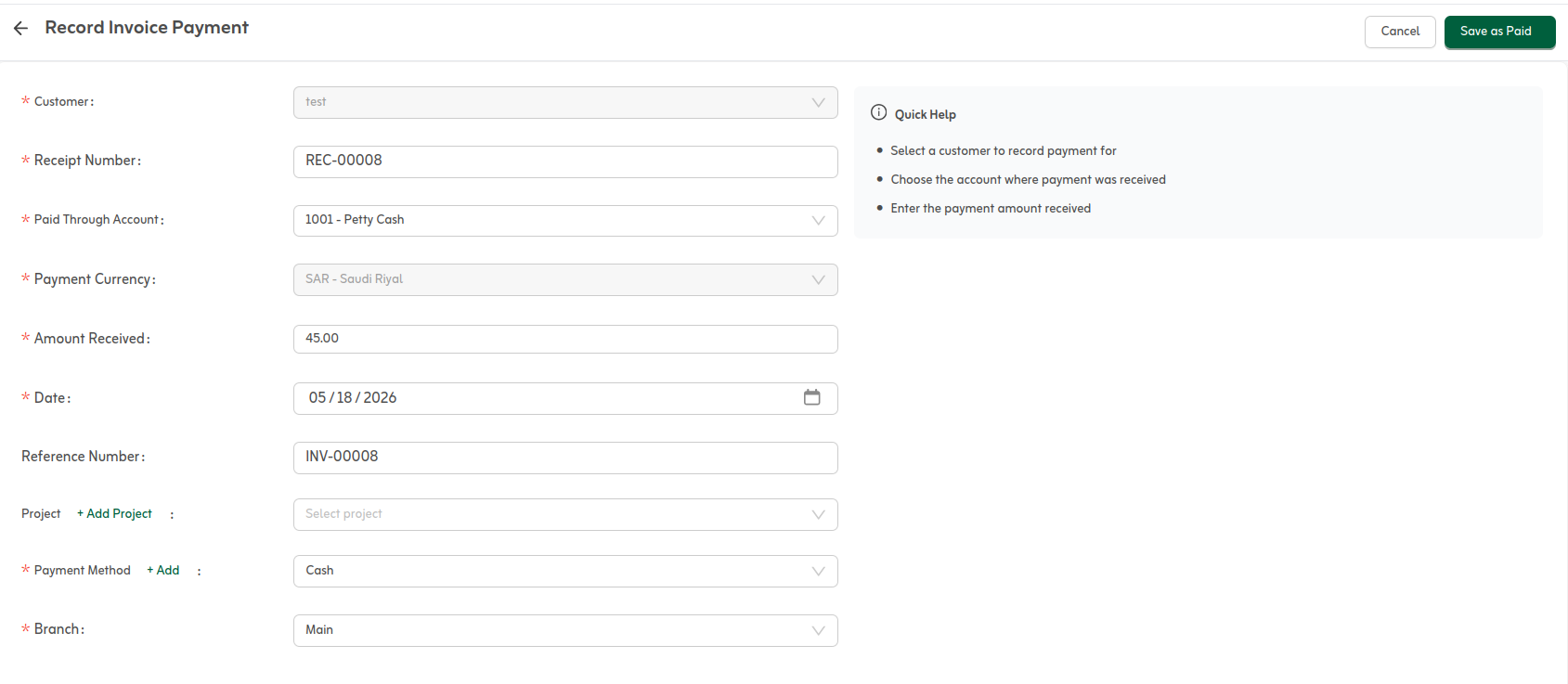
After you save, invoice status updates (partially or fully paid) and the receipt appears in ageing and cash-flow views. Reconcile against your bank statement later to confirm amount and reference.
If cash arrives before an invoice exists, create the invoice first or use the receipt path your process defines. For overpayments, apply the surplus to other open invoices or leave customer credit per your policy.
Quick tips
- Match the payment date to the bank deposit date when possible.
- Pick the correct paid-through account (bank or cash) so balances land in the right place.
- Add the transfer reference in the description to speed up bank reconciliation.