
يُستخدم إشعار الدائن لتخفيض ذمة العميل أو تصحيح إيرادات وفق فاتورة سبقت وإعادة محاذاة ضريبة القيمة المضافة عندما لا يكفي إلغاء بسيط. كل إصدار وفق إعداداتكم للفوترة الإلكترونية يرتبط بالفاتورة المرجعية ويحافظ على سلسلة تدقيق أمام هيئة الزكاة والضريبة أو المراجعين.
الغالب أن يُنشأ من المبيعات بعد موافقة على إرجاع جزئي أو خطأ تسعير؛ يمكنكم لاحقاً تطبيق الرصيد على فاتورة أو اتباع استرداد نقدي. القائمة المرقّمة أدناه تعيد خطوات دليل الترحيب لمستند جديد.
إنشاء إشعار دائن
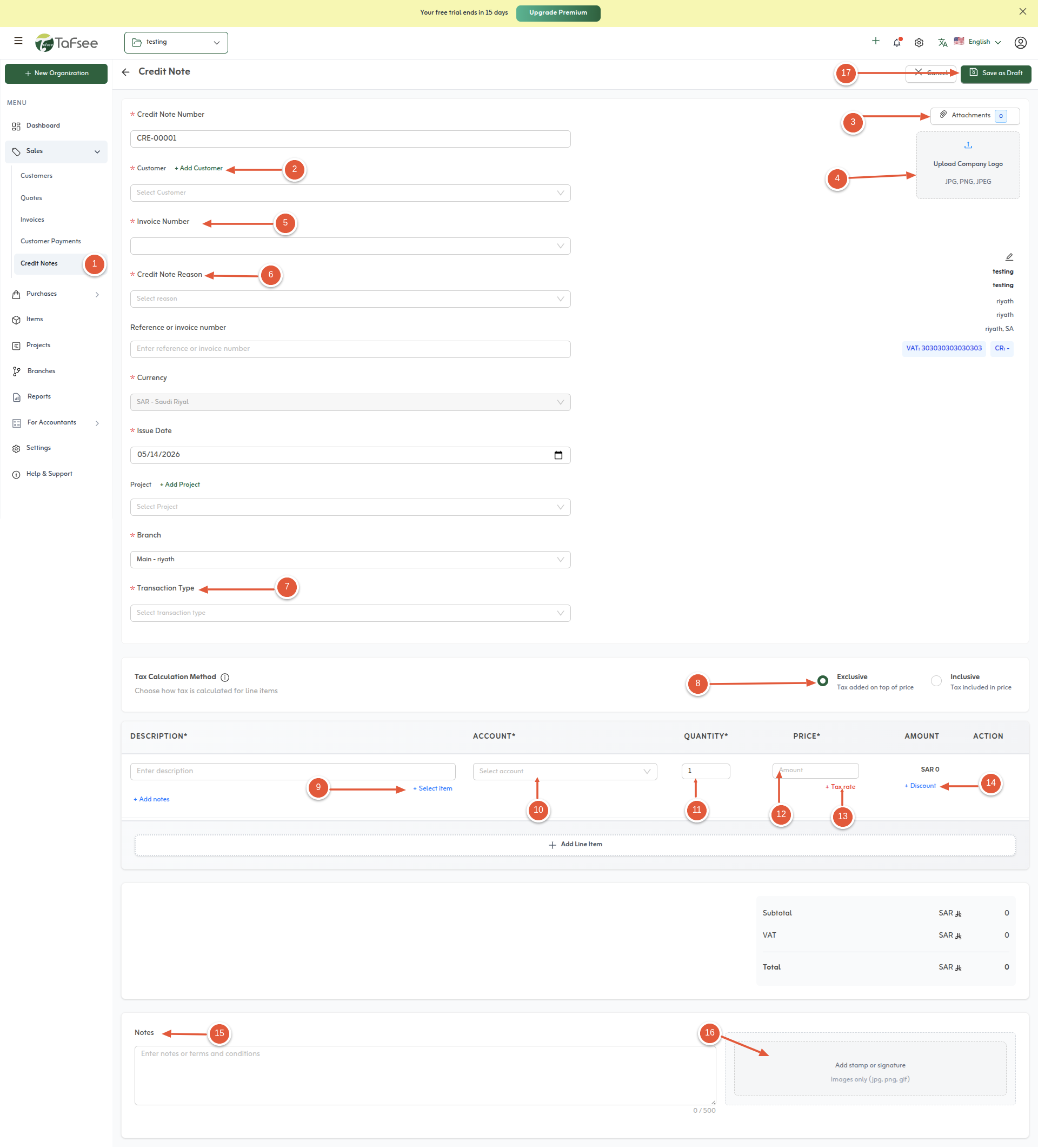
الخطوات نفسها روح دليل الترحيب؛ لقطة الشاشة توضح نموذج إنشاء إشعار دائن.
- انتقل إلى المبيعات، ثم اختر إشعار الدائن لإنشاء إشعار جديد.
- حدد عميل إشعار الدائن.
- أضفوا مرفقاً عند الحاجة إلى مستندات داعمة.
- ارفعوا شعار المؤسسة ليتوافق تصدير PDF مع الهوية.
- اختاروا الفاتورة الأصل التي يعدّلها إشعار الدائن.
- اذكروا سبب الإصدار تجارياً أو نظامياً وفق حاجتكم.
- اختاروا نوع المعاملة المتاح لديكم ومنها التوريد العادي أو التصدير.
- اختاروا ما إذا كانت الضريبة شاملة أو حصرية على المستند.
- أضيفوا بنود الأسطر من قسم العناصر باستخدام أصناف أو نصوص وفق التهيئة.
- اختاروا تصنيف الإيراد أو الحساب لكل سطر عندما يفرض دليل الحسابات ذلك.
- أدخل كميات الأسطر المُراد إشعار الدائن عنها.
- حددوا أسعار الوحدات المطابقة للمبالغ المعكوسة أو المصحّحة.
- اختاروا معاملة الضريبة لكل سطر—ضريبة على المبيعات أو صفر أو معفى أو خارج النطاق—وفق أصل التوريد عند الاقتضاء.
- طبّقوا خصماً على السطر بنسبة أو مبلغ ثابت إذا تضمّنت التسوية بدلات تجارية.
- أضيفوا ملاحظات رأس أو تذييل أو تشغيلية وفق الحاجة.
- أضيفوا توقيعاً رقمياً أو ختماً إذا تطلب ذلك مسار الموافقات.
- احفظوا إشعار الدائن للترحيل أو احتفظوا بمسودة وفق مسار الإصدار.
ما بعد الإصدار
- لمقاصة رصيد دائن مع ذمم مفتوحة راجعوا تطبيق إشعارات الدائن على الفاتورة في هذا القسم.
- لتحويل الائتمان إلى صرف نقدي للعميل اتبعوا استرداد إشعارات الدائن مع موافقات الخزينة.
نصائح سريعة
- اربطوا الإشعار بالفاتورة الأصل دائماً للحفاظ على سلسلة ضريبة القيمة المضافة.
- دوّنوا سبب الإصدار في الحقل المخصص—يساعد المراجعين والهيئة.
- طابقوا معاملة الضريبة لكل سطر مع الفاتورة الأصل عند الإمكان.