
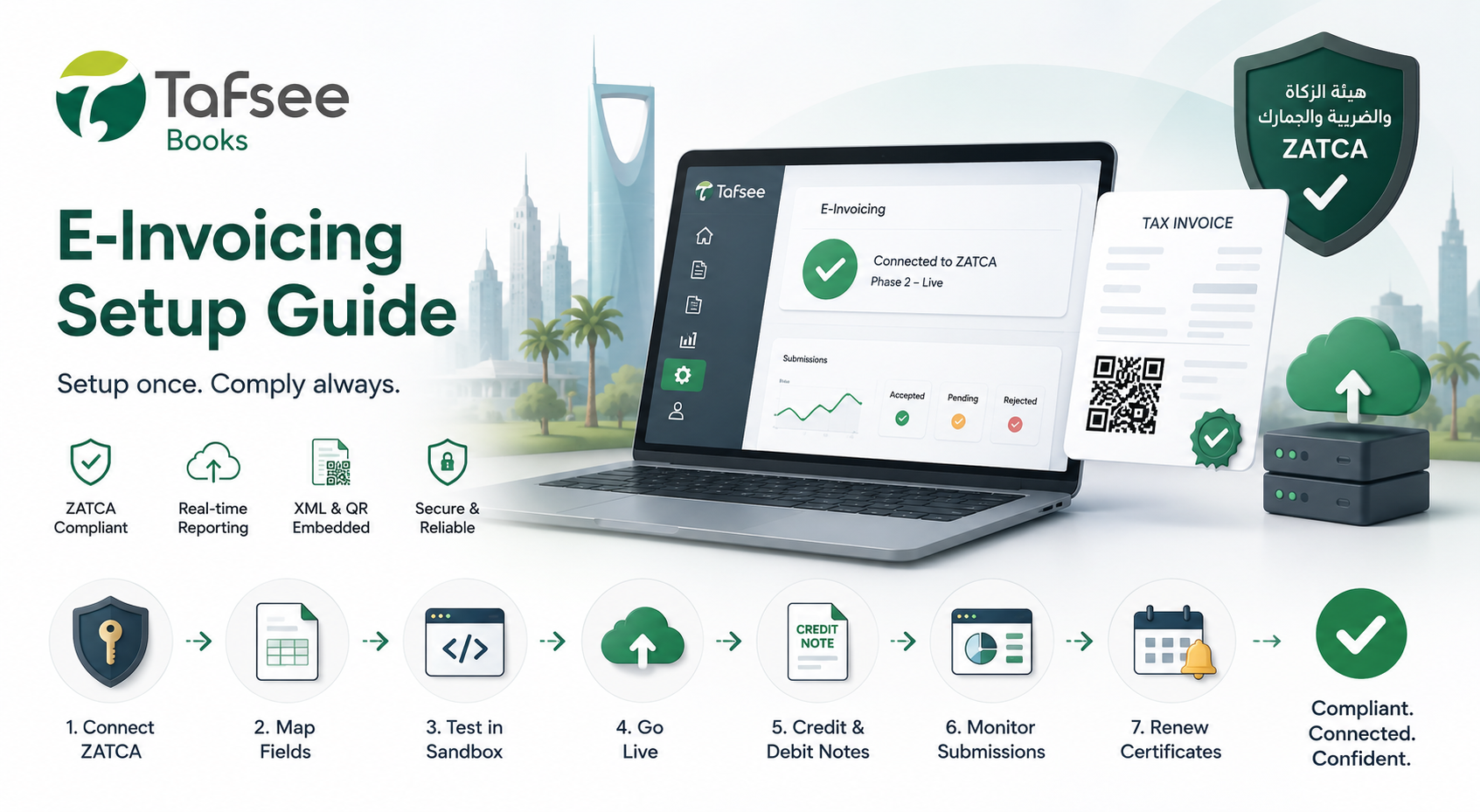
الفوترة الإلكترونية لم تعد اختيارية للأعمال السعودية. المرحلة الثانية من ZATCA تتطلب إبلاغًا ومقاصة فورية للفواتير، مما يجعل إعداد البرنامج أمرًا ضروريًا.
قبل البدء: الجاهزية لـ ZATCA
تأكد أولًا من تسجيل الشركة والرقم الضريبي وأساسيات الامتثال. استخدم قائمة التحقق من الامتثال لـ ZATCA للشركات السعودية للتحقق من المتطلبات قبل تفعيل الإرسال المباشر.
إعداد الفوترة الإلكترونية خطوة بخطوة في تفسير بوكس
- ربط بيانات ZATCAانتقل إلى الإعدادات ← الفوترة الإلكترونية في تفسير بوكس وأدخل بيانات ZATCA وتفاصيل الشهادة. هذا الإعداد لمرة واحدة يربط حسابك بمنصة ZATCA.
- ربط حقول الفاتورةاربط قوالب الفواتير الحالية بحقول مخطط XML المطلوب من ZATCA. يوفر تفسير بوكس معالج ربط موجه يكتشف معظم الحقول تلقائيًا.
- الاختبار في بيئة الاختبارأرسل فاتورة تجريبية عبر بيئة الاختبار قبل تفعيل الإرسال المباشر. هذا يضمن صحة ربط الحقول وتوليد رمز QR وبنية XML.
- تفعيل الوضع المباشربمجرد نجاح الاختبار، فعّل الوضع المباشر. كل فاتورة تنشئها ستولد XML وتضمن رمز QR وتتبع قواعد الترقيم التسلسلي.
- إعداد إشعارات الائتمان والخصميربط تفسير بوكس إشعارات الائتمان والخصم تلقائيًا بالفاتورة الأصلية ويولد مرجع XML الصحيح.
- مراقبة الإرسالاستخدم لوحة التقديم لتتبع الفواتير المقبولة والمعلقة والمرفوضة. رسائل الخطأ الواضحة تساعدك على الإصلاح وإعادة الإرسال بسرعة.
- تجديد الشهادات في الوقت المناسبيرسل تفسير بوكس تذكيرات تجديد قبل 30 يومًا من انتهاء صلاحية الشهادة لتجنب فشل الإرسال المفاجئ.
ما الذي يجب التحقق منه بعد التشغيل
- ظهور رموز QR بشكل صحيح في كل فاتورة
- عدم وجود فجوات في الترقيم التسلسلي للفواتير
- توافق مخرجات XML مع متطلبات مخطط ZATCA
- مراجعة الفواتير المرفوضة وإصلاحها خلال نفس الفترة الضريبية